Basic Actions
In this section we will explore some useful template actions to enhance the docx templating and better exploit the features of the go-template-docx library.
Hardcoding strings in the template
If you try to type the " character directly in the docx template, it will be converted to a special character “ or ” (curly quotes), this is Word's default behaviour, which is not a valid character to quote strings values.
{{color .Text "#ff0000"}} ✅ No error{{color .Text `#ff0000`}} ✅ No error{{color .Text “#ff0000”}} ❌ Will cause an error
To solve this you have these options:
- Change the word settings to disable the automatic replacement of quotes
- Use backticks
`to quote string values - Copy and paste
"as needed
For Loops with range
The range action iterates over elements in a variety of data structures. It is commonly used to loop through slices, arrays, maps.
Input file template.docx: 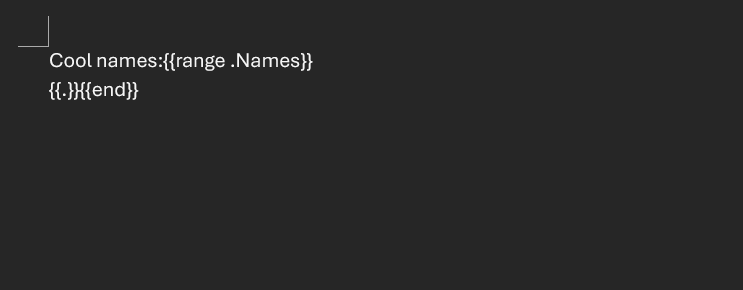
Here we use the
.namespace which contains the current list item of the loop, but it is actually possible to assign the items of the range loop.
Golang code:
package main

import (
	"fmt"

	gotemplatedocx "github.com/JJJJJJack/go-template-docx"
)

type ExampleStruct struct {
	Names []string
}

func main() {
	docxTemplate, err := gotemplatedocx.NewDocxTemplateFromFilename("template.docx")
	if err != nil {
		fmt.Println("Error loading template:", err)
		return
	}

	templateValues := ExampleStruct{
		[]string{"Alice", "Bob", "Charlie"},
	}

	err = docxTemplate.Apply(templateValues)
	if err != nil {
		fmt.Println("Error applying template values:", err)
		return
	}

	err = docxTemplate.Save("template_output.docx")
	if err != nil {
		fmt.Println("Error saving output file:", err)
		return
	}
}
Output file template_output.docx: 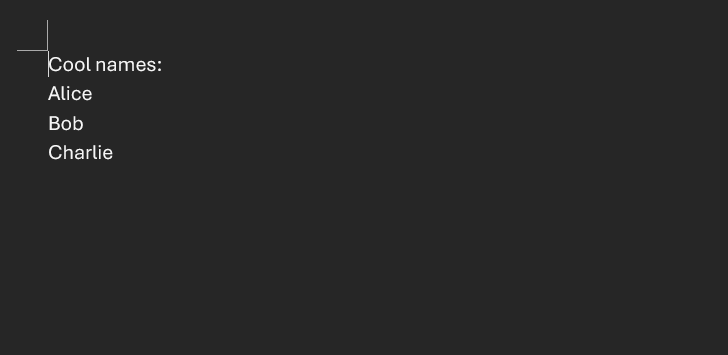
Known issue: actions like
{{range .Names}}and{{end}}will be removed when resolved, this will leave an empty line if there is no other text around.
Conditionals with if
The if action allows you to conditionally include or exclude parts of the template based on the value of a field.
Input file template.docx: 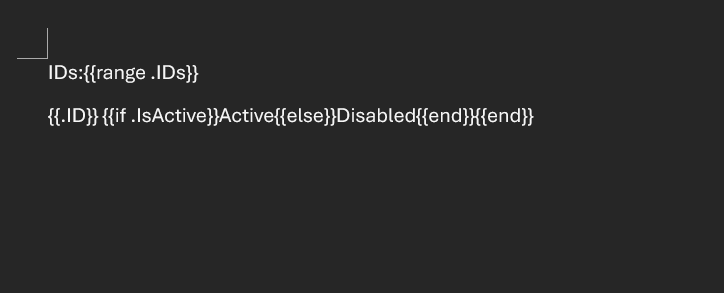
Golang code:
package main

import (
	"fmt"

	gotemplatedocx "github.com/JJJJJJack/go-template-docx"
)

type ID struct {
	ID       int
	IsActive bool
}

type ExampleStruct struct {
	IDs []ID
}

func main() {
	docxTemplate, err := gotemplatedocx.NewDocxTemplateFromFilename("template.docx")
	if err != nil {
		fmt.Println("Error loading template:", err)
		return
	}

	templateValues := ExampleStruct{
		IDs: []ID{
			{ID: 1, IsActive: true},
			{ID: 2, IsActive: false},
			{ID: 3, IsActive: true},
		},
	}

	err = docxTemplate.Apply(templateValues)
	if err != nil {
		fmt.Println("Error applying template values:", err)
		return
	}

	err = docxTemplate.Save("template_output.docx")
	if err != nil {
		fmt.Println("Error saving output file:", err)
		return
	}
}
Output file template_output.docx: 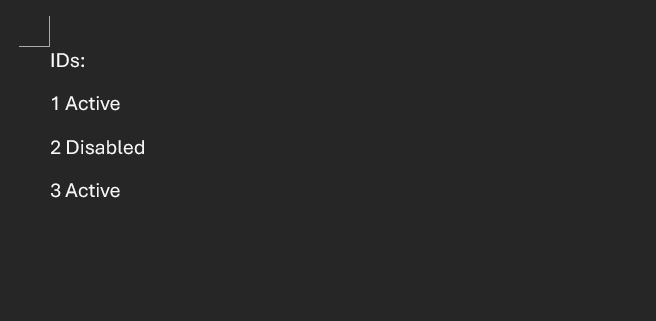
Assigning variables with :=
While you can do simple assignments like {{ $name := .Name }}, the assignment action could really be helpful for specific cases such as naming loops items:{{range $index, $value := .Array}}Index = {{$index}}, value = {{$value}}{{end}}
Try stuff
All template actions can be found on the original library's documentation, the permutations of these actions are virtually endless and a little bit like a programming language itself, so the best way to master it is to try it out by yourself!
Unexpected behaviors
Sometimes, the template clashes with Word internal's shenanigans, my main job on the library is to make it avoid and work around these issues, I hope it will become a silver bullet for fast and easy docx templating but as of the time I'm writing this you can still encounter some unexpected behaviors, feel free to open issues or discussions on improvements and bugs on the github repository.